Loading…
Discord Rich Presence
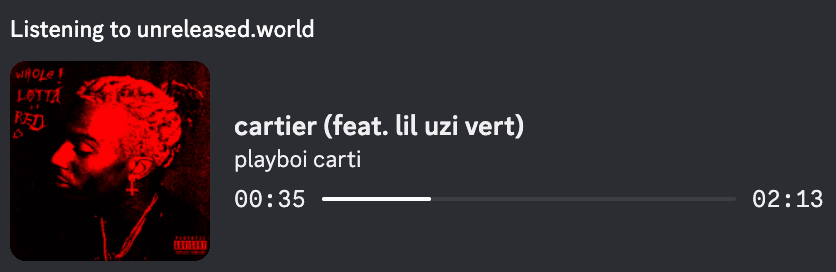
Show what you're listening to on unreleased.world directly on your Discord profile. Open source, built and published via GitHub.
Recommended for your desktop
Windows (64-bit)
EXE download • 77.7 MB
One-click installer. SmartScreen may warn once — see the steps below.
Built by GitHub Actions • Artifacts hosted on GitHub Releases
No native Linux build yet, but you can still inspect the source code or run it via Node/Electron from the GitHub repository.
All Downloads (GitHub hosted)
macOS (Apple Silicon · M-series)
DMG • 95.6 MB
Apple Silicon (arm64). Signed, but not notarized — see the install steps below.
sha256 1e8ae982d81f739122fea40511a78c31c1836153b066ece77cfe66f6cbd0bfa1
macOS (Intel)
DMG • 103.6 MB
Intel Macs (x64). Signed, but not notarized — see the install steps below.
sha256 318672067a63c99677f2d9c57209f437de76faca280115adad0f966fc44c27ff
Windows (64-bit)
EXE • 77.7 MB
One-click installer. SmartScreen may warn once — see the steps below.
sha256 999c0ac4d398cf8cf63e8f87b0c825b7ddc9d9bf916e0f6b137d5617a713d779
Windows (32-bit)
EXE • 72.6 MB
Only for older 32-bit Windows. If unsure, take the 64-bit build.
sha256 08dc272bf9d793b03551acfe925794c47b450dfb1c25fcf1ab26417e45a39d47
Linux (AppImage)
AppImage • 107.5 MB
Runs anywhere. chmod +x it, then launch — no install needed.
sha256 f48442649eec53bae7bf9dab7196e1a215200ce96444cd035ea57fac95a1bc3e
Linux (Debian / Ubuntu)
DEB • 74.3 MB
sudo apt install ./Aura-linux-amd64.deb
sha256 f8c89676f501e5db98b6b05b34fb02c8a36571ba5a561db971c60c8f88392b50
Windows (both architectures)
EXE • 149.9 MB
Bundles the 32- and 64-bit installers in one file. Larger; only useful for redistribution.
sha256 58055af07d79c0c7ab2eeec52aea019ede8fc8df4e50fb6c6edb879d5967b00c
macOS (Apple Silicon) — archive
ZIP • 92.2 MB
The .app without the disk image. Prefer the DMG unless you need this.
sha256 9fdbfc46e5a386ef1e379ccc30033c013910b4bfc96fabc771197f6c59ac141f
macOS (Intel) — archive
ZIP • 100.2 MB
The .app without the disk image. Prefer the DMG unless you need this.
sha256 00da3221036b5abd7b4d77e2856211135fcbc7088c4498dd1f64d4badcd78401
Linux — archive
ZIP • 102.2 MB
Unpacked build. Prefer the AppImage unless you need this.
sha256 a2ed74b84925aedee4510f6feba5e4f9723eef4d37a478d22df657a5fa9db823
All binaries are built from this repository and published as artifacts on .
Installation
Install on macOS
Works on Apple Silicon (M1–M4) and Intel.
No security warnings with this method. It downloads, verifies the app's signature, installs it, and opens it — about ten seconds, no clicking through System Settings.
- 1.Open Terminal — press ⌘ Space, type “Terminal”, hit Return.
- 2.Paste this and press Return:
$ curl -fsSL https://unreleased.world/install.sh | sh - 3.That's it — the app installs and opens itself.
Never paste a command you can't read. Read the script first — it's short, commented, and only writes to your Applications folder. It also refuses to install if the app's signature doesn't check out.
Windows
- 1.Download the installer using the button above.
- 2.Run the downloaded
.exe. - 3.If SmartScreen appears, click "More info" → "Run anyway".
- 4.Complete the setup wizard and launch the app.
The Windows build is unsigned, so SmartScreen may warn once. Every installer is built in public from this GitHub repository — you can read the workflow and the source that produced it.
Linux
- 1.Take the AppImage — it runs on any distribution. On Debian or Ubuntu the
.debis available instead. - 2.AppImage: mark it executable, then run it.
chmod +x Aura-linux-x86_64.AppImage - 3.Or install the package:
sudo apt install ./Aura-linux-amd64.deb - 4.Launch it with the Discord desktop app running.
If Discord itself came from Flatpak, its RPC socket lives inside the sandbox and the app cannot see it. Link it out once:ln -sf $XDG_RUNTIME_DIR/app/com.discordapp.Discord/discord-ipc-0 $XDG_RUNTIME_DIR/discord-ipc-0
Features
Live Playback
Rich Presence updates in real time as you play, pause, or skip tracks on unreleased.world.
Album Art & Context
Shows the track name, artist, album context, and progress bar directly in your Discord profile.
Lightweight & Private
Runs quietly in your tray, only syncing playback metadata needed for Discord Rich Presence. All code is public and auditable.
Source code & verification
Source (.zip)
Download the exact source the current release was built from, as a ZIP archive.
Source (.tar.gz)
Prefer tarballs? Grab the same source as a compressed tar.gz.
GitHub Releases
View all artifacts for this version (macOS, Windows, source code) on GitHub's release page.
Open Source Electron helper
Built from the
electron-helper folder in this repo.All workflows live in the .github folder, which is public like the rest of the repo. Anyone can verify how binaries are built and exactly what code is running.